Most advice on AI and SEO lands in one of two camps. One camp says publish 500 AI articles and watch the traffic roll in. The other says never touch AI or Google will punish you. Both are wrong.
Claude can save you a lot of hours on SEO. It can also help you publish a pile of forgettable pages if you use it badly. This guide shows you how to do the first one.
Quick answer: Claude won’t rank your site on its own. What it does well is the slow work around SEO: grouping keywords, writing briefs, reading crawl reports, drafting schema, tightening drafts. You bring the data, the real experience and the final say. Do that, and Claude becomes a very fast assistant that helps you rank in Google Search.
Author’s note (November 2026): We refreshed this guide with current Claude plan prices, added the free SearchFit SEO plugin for Claude Code, and added a section on what Google says about AI content. Older guides still say Claude can’t search the web or connect to tools. That’s out of date.
Quick Reference: What Claude Can Do for Each SEO Task
| SEO task | What you give Claude | What you get back | Your job |
|---|
| Keyword clustering | A keyword export (CSV) | Groups by search intent, plus a page for each | Pick what fits the business |
| SERP and intent research | Top ranking URLs, or let Claude search | Common sections and gaps | Check it against the live results |
| Content briefs | Keyword, audience, competitor notes | An outline with questions to answer | Add your angle and proof |
| Drafting | Brief, brand voice, your real notes | A solid first draft | Add real stories, fix facts |
| Content refresh | Page text and Search Console data | A list of updates, ranked | Decide what’s worth the time |
| Titles and meta descriptions | Page list and target keywords | Several options per page | Check length, pick one |
| Schema and redirects | Page details, URL patterns | JSON-LD, regex, rules | Test before it goes live |
| Technical audit | Crawl export | Issues sorted by impact | Confirm and fix |
| Internal links | A list of URLs and topics | Link suggestions with anchors | Check they read naturally |
What Claude Can and Can’t Do for SEO
Claude vs You: who does what in SEO
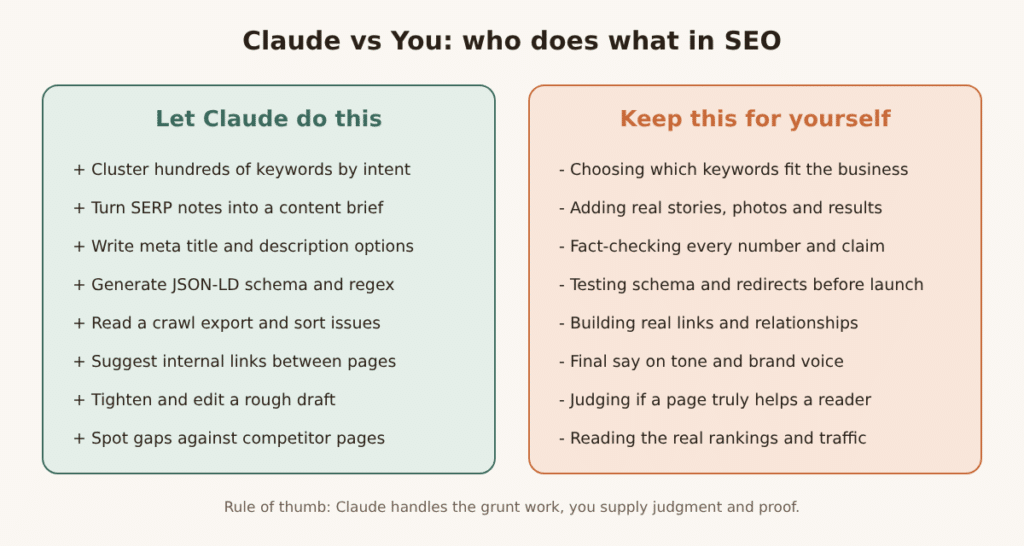
Claude is a language model made by Anthropic. It reads, writes, sorts and spots patterns really well. That’s most of what SEO work is, once you strip away the tools.
Where it helps a lot
- It reads long files. A big crawl export, a pile of competitor pages or a full content audit fits in one chat, and you can ask questions about it.
- It writes clean code for schema, redirects and regex without a developer on call.
- It keeps a consistent voice across long pieces when you give it a style guide.
- With web search turned on, it can look at current pages instead of guessing from memory.
- It can connect to other apps through connectors, and Claude Code has plugins made for SEO work (more on that in Workflow 9).
Where you need to be careful
- It doesn’t see your private data unless you upload it or connect it. Claude has no idea how your site performs until you show it.
- It can be confidently wrong. Numbers, dates, quotes and “facts” all need checking.
- It’s not reliable at counting characters. Always check title and meta lengths in a proper tool.
- It can’t build links, earn reviews or do the real-world things that make a brand trusted.
- It doesn’t know which keywords are right for your business. You do.
Will Google Penalize AI Content?
Short answer: no, not for using AI. Google has said that using AI is fine as long as the content is helpful and made for people. What it does go after is something called scaled content abuse. That means publishing lots of pages mainly to manipulate rankings instead of helping readers. Google says this applies no matter how the pages were made, whether by AI, humans or a mix.
There’s a second point that’s easy to miss. Google’s quality rater guidelines treat content made with little effort, originality or editing as low quality, and generative AI is called out as one way people make it.
So the test isn’t “was AI involved?” The test is “does this page give a reader something the other pages on this topic don’t?”
Here’s a simple way to stay on the right side:
- Add something only you have: real examples, your own data, photos, quotes from people who did the work.
- Put a real name and a short bio on the page.
- Edit every draft by hand. Check every claim.
- Publish fewer, better pages instead of hundreds of thin ones.
- Never use Claude to invent reviews, case studies, statistics or expert quotes.
You can read Google’s own guidance on using generative AI content in Search Central.
Which Claude Plan Do You Need?
Prices below come from Claude’s pricing page as of November 2026. They can change, so check claude.com/pricing before you buy.
| Plan | Price | Good for SEO if you… |
|---|
| Free | $0 | Want to test prompts. Includes web search, file uploads and up to 5 Projects, with limited usage |
| Pro | $17/month billed yearly ($20 monthly) | Do SEO weekly. Adds more usage, unlimited Projects, Research and Claude Code |
| Max | $100/month | Run lots of audits or big content batches every day |
| Ultra | $200/month | Work with huge files for most of the day |
| Team | $20 per seat billed yearly ($25 monthly) | Share Projects and workflows across a team |
| API | Pay per token | Build your own automations |
For API users, the 2026 prices per million tokens are $2 in and $10 out for Sonnet 5.5, $4 in and $20 out for Opus 5.5, and $0.10 in and $0.50 out for Haiku 5.5. Haiku is the cheap one for bulk jobs like writing thousands of meta descriptions. Sonnet is a good all-rounder.
Our advice: Start free for a week and run the workflows below. If you’re still using it daily, move to Pro.
Set Claude Up Before Your First Prompt
Here’s the step most people skip, and it’s why their output sounds generic. Claude can only work with what you tell it. So tell it once, properly.
Create a Project in Claude (call it something like “SEO: yoursite.com”) and add these four things:
- Brand voice notes. A page or two on how you write. Add three real paragraphs you like as examples.
- Audience. Who reads your site, what they already know and what they’re trying to get done.
- Your keyword map. The pages you have, the keyword each one targets, and what’s still missing.
- A “don’t write like this” list. Phrases you hate, claims you can’t make and topics to avoid.
Then paste this into the Project instructions:
You are my SEO assistant for [website]. We help [audience] with [what you offer].

Rules:
- Write in plain, simple English. Short sentences. No hype.
- Never invent statistics, quotes, reviews or case studies.
- If you're not sure about a fact, say so and tell me how to check it.
- Ask me questions when you need real examples from my business.
- Follow the brand voice notes in the project files.
The Claude SEO workflow
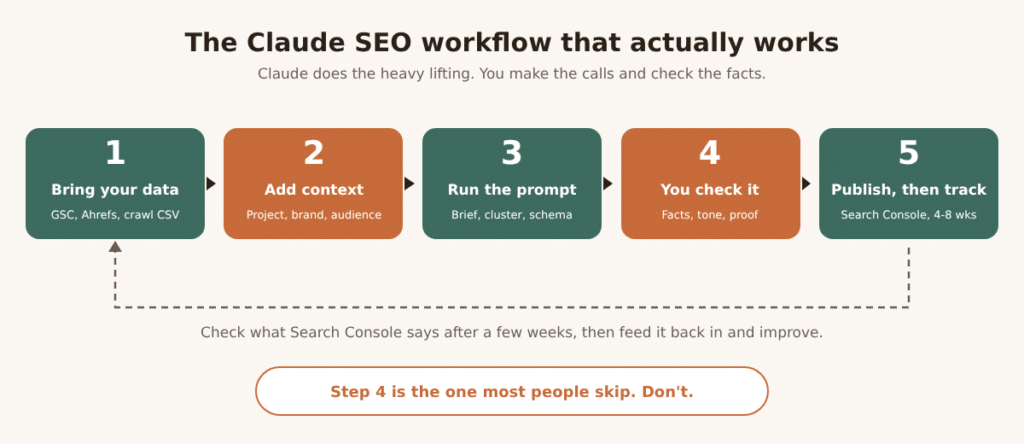
Every workflow below follows the same five steps in this picture. Bring data, add context, run the prompt, check the result yourself, then publish and track.
Workflow 1: Cluster Your Keywords
Why it matters: Ranking for one keyword rarely happens in isolation. Google looks at whether you cover a topic well, which is often called topical authority. Grouping keywords by intent tells you which ones belong on one page and which need their own page.
How to do it
- Export keywords from your tool of choice (Search Console, Ahrefs, Semrush, a spreadsheet).
- Upload the CSV to Claude.
- Use this prompt:
Here is a keyword list for [site]. Group these keywords into clusters by search intent.

For each cluster, give me:
- A cluster name
- The main keyword
- The search intent (informational, commercial, transactional or navigational)
- Whether it should be one page or needs separate pages
- A working page title

Put it in a table. Flag any keyword that doesn't fit our business and say why.
What good output looks like: a table where “best running shoes for flat feet” and “flat feet running shoes” sit together, while “how to fix flat feet” lands in a separate, informational group. If Claude lumps a “buy now” keyword together with a “what is” keyword, push back. They need different pages.
Watch out: Claude doesn’t know search volume or difficulty unless it’s in your file. Don’t ask it to guess numbers. Get those from your SEO tool.
Workflow 2: Read Search Intent and Find Content Gaps
Why it matters: The pages already ranking tell you what Google thinks searchers want. Your job is to match that need, then do it better.
How to do it
Turn on web search in Claude, or paste in the text from the top five results yourself. Then ask:
I want to rank for "[keyword]". Look at the top 5 results (or the pages I pasted).

Tell me:
1. What is the searcher really trying to do?
2. What sections and questions show up on most of these pages?
3. What do they all leave out?
4. What format wins here (guide, list, comparison, tool)?
5. What could we add that's genuinely new?
Watch out: Search results change by country and by day, and Claude sees a snapshot. Open the real search results yourself and take a quick look. It takes two minutes and catches mistakes.
Workflow 3: Build Content Briefs
A good brief is the difference between a page that answers the question and one that wanders. Claude is good at this because it’s a job of organizing, not inventing.
Write a content brief for a page targeting "[primary keyword]".

Include:
- Search intent and who the reader is
- A suggested title and slug
- An outline with H2s and H3s (use real questions people ask)
- Key points each section must cover
- Related terms to use where they fit naturally: [list]
- Questions for an FAQ section
- Internal pages to link to: [list of URLs]
- What proof or examples I need to add myself (real data, photos, quotes)

Keep headings descriptive. No fluff.
That last bullet matters. Asking Claude to list what you must bring makes sure the page doesn’t ship without original value.
Workflow 4: Draft Without Sounding Like a Robot
This is where most AI content goes wrong. Readers can tell. So can editors. The fix is simple: don’t let Claude write from thin air. Make it write from your material.
The interview method
Instead of “write me a post about X,” try this:
I'm writing about [topic]. Before you write anything, interview me.
Ask me 8 questions, one at a time, about my real experience with this:
what I've seen, what went wrong, what surprised me, what I'd tell a friend.
Wait for my answers. Then write a draft using my words and examples.
You’ll get a draft full of real detail, because the detail came from you.
Make it read like a person
After the draft, run an edit pass:
Edit this draft so it sounds like a person talking. Rules:
- Use short sentences and everyday words
- Cut filler like "in today's digital world" and "it's important to note"
- Vary sentence length
- Keep my examples exactly as written
- Don't add facts I didn't give you
Workflow 5: Refresh Old Pages Using Search Console
Updating an existing page often beats writing a new one. The page already has history with Google, so small improvements can move it faster.
Find the right pages
- In Google Search Console, open Performance and export the Queries and Pages reports.
- Look for pages sitting around positions 8 to 20. They already rank. They just need a push.
- Also look for pages with lots of impressions but few clicks. That usually means the title or description isn’t convincing.
Then ask Claude
Here is a page and its Search Console data for the last 3 months.

Page text: [paste]
Top queries with impressions, clicks and average position: [paste]

1. Which queries is this page close to winning?
2. What's missing from the page for those queries?
3. Which sections are outdated, thin or off-topic?
4. Give me a ranked list of updates, biggest impact first.
5. Suggest a new title and meta description for the top query.
Watch out: Don’t rewrite the whole page. Change what the data says needs changing. Keep what already works, or you can lose rankings you already had.
Workflow 6: Write Titles and Meta Descriptions
This is one of the quickest wins. A better title can lift clicks without changing your ranking at all.
Write 5 title tag options and 3 meta descriptions for each page below.
Rules:
- Titles: about 50 to 60 characters, main keyword near the front
- Descriptions: about 150 to 155 characters, include the keyword once
- Say what the reader gets. Be specific
- No clickbait, no ALL CAPS, no fake urgency

Pages: [list URL, target keyword, one-line summary]
Watch out: Claude is bad at counting characters. Paste the results into a length checker or a spreadsheet with a LEN formula before you publish. Google also shortens titles by pixel width, not character count, so a title full of wide letters may get cut off.
Workflow 7: Technical SEO, Schema and Audits
Here Claude can save real developer time. Always test its work before it goes live.
Schema markup (JSON-LD)
Write JSON-LD schema for this page. Type: [Article / LocalBusiness / Product / Organization].
Details: [paste the facts: name, address, author, dates, price, etc.]
Use only the details I give you. Add comments explaining each property.
Test the result in Google’s Rich Results Test and the Schema Markup Validator. One honest note: Google now shows FAQ rich results for only a small set of sites, so don’t add FAQ schema hoping for a special result. Schema still helps machines understand your page, though, which matters more every year.
Redirects and regex
We're moving from [old URL pattern] to [new URL pattern].
Write 301 redirect rules for [Apache / Nginx / Cloudflare / WordPress plugin].
Handle www and non-www, trailing slashes and query strings.
Give me 5 test URLs and where each should land.
Test redirects on a staging site first. A single wrong rule can send thousands of pages to the wrong place.
Crawl audits
Export a crawl from Screaming Frog, Sitebulb or another crawler. Upload the CSV and ask:
Here's a crawl export. Find the main technical SEO problems.
Group them by type (broken links, redirects, duplicate titles, missing meta, slow pages, etc.).
For each group, tell me how many pages are affected, how serious it is and how to fix it.
Give me a to-do list in priority order.
Workflow 8: Plan Internal Links
Internal links help Google find pages and understand how your content fits together. They’re also dull to do by hand, which is why Claude is useful here.
Here's a list of my pages with their URLs, titles and main topics: [paste]

For this new page: [URL and summary]
1. Which existing pages should link TO it? Suggest the exact sentence and anchor text
2. Which existing pages should it link OUT to?
Use natural, descriptive anchor text. Don't repeat the same anchor over and over.
Keep it sensible. Three to five relevant links usually beats fifteen forced ones.
Workflow 9: Run SEO Audits with Claude Code and the SearchFit Plugin
If you manage your own website files, or work with a developer, there’s a free option worth trying. SearchFit SEO is a plugin from SearchFit.ai that runs inside Claude Code (Claude’s coding tool, included on paid plans).
According to its marketplace page, it includes 11 skills that switch on automatically. These cover SEO audits, technical SEO, on-page optimization, broken link detection, internal linking, schema markup, content strategy, content briefs, keyword clustering, AI visibility tracking and content translation. It also has three agents: an SEO Auditor that gives scored reports, a Content Strategist that builds content plans, and a Competitor Analyzer that looks for market gaps. At the time of writing it showed over 6,000 installs.
Commands you can run
| Command | What it does |
|---|
/seo-check | Gives a quick scored SEO check of an HTML page |
/generate-schema | Creates ready-to-paste JSON-LD (Article, Product, FAQ, HowTo and more) |
/keyword-cluster | Groups a keyword list by intent and maps it to content types |
/create-topic and /create-content | Researches a topic and drafts an SEO-focused article |
/translate-content | Localizes content into other languages |
You can also just ask in plain words, like “audit example.com for SEO issues,” and the right skill will kick in.
A few honest notes. This lives in the developer-style Claude Code tool, so it suits people who are comfortable working with site files. Its source is public on GitHub, so skim it before you install anything on a work machine. And treat its scores as a starting point, not a verdict. Any automatic score can miss context that you know about your business. <!– SCREENSHOT 3: Take a screenshot of the SearchFit plugin page in the Claude marketplace, and one of /seo-check output on a page of your own site. –>
Workflow 10: Get Ready for AI Overviews and AI Search
More people now get answers straight from Google’s AI Overviews, and from tools like Claude and ChatGPT. Nobody can promise you’ll be cited. But some habits clearly help your pages get picked up:
- Answer the question early. Put a clear two-to-three sentence answer near the top of the page.
- Use descriptive headings that match real questions people ask.
- Be specific. Names, dates, numbers and examples are easier to quote than vague claims.
- Show who wrote it. Add an author name, short bio and credentials.
- Keep your brand details consistent across your site, Google Business Profile and social profiles. Same name, same address, same description.
- Add structured data that matches what’s on the page.
- Publish original things others will cite: a small survey, a real case study, a simple tool.
A prompt to try:
Read this page. If someone asked an AI assistant "[question]", would this page be a good source to quote?
Tell me what's unclear, missing or hard to quote. Suggest changes to make the answer clearer without making it longer.
Mistakes That Hurt Your Rankings
- Publishing raw output. If you didn’t edit it, don’t post it.
- Mass-producing pages. Hundreds of near-identical location or service pages are the classic scaled content trap.
- Trusting numbers. Claude can make up statistics that sound real. Every figure needs a source you’ve actually opened.
- Skipping the real experience. Pages with no first-hand detail read like everything else on page one.
- Stuffing keywords. Write for the reader first. Related terms should show up naturally.
- Changing too much at once. If you rewrite 50 pages in a day, you won’t know what worked.
- Not measuring. If you don’t note your starting numbers, you can’t prove anything.
- Pasting private data. Don’t upload client passwords, personal data or anything you’re not allowed to share.
Your Pre-Publish Checklist
Before any Claude-assisted page goes live, tick every box:
- [ ] Every fact, number and quote has a source I’ve opened
- [ ] The page has at least one thing only we could write (example, data, photo, story)
- [ ] A real author is named, with a short bio
- [ ] The search intent matches what’s ranking now
- [ ] Title and meta description lengths are checked in a tool
- [ ] Schema passes the Rich Results Test
- [ ] Internal links read naturally and point to the right pages
- [ ] I read the whole thing out loud and it sounds like us
- [ ] The page is better than the current top results, not just different
Your First 30 Days with Claude for SEO
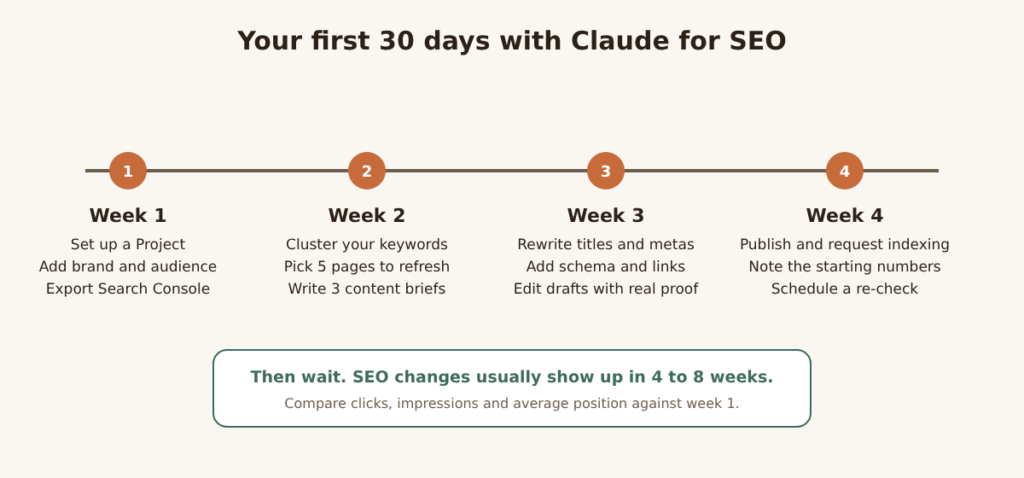
Your first 30 days with Claude for SEO
Don’t try to do everything. Pick a handful of pages and do them well.
- Week 1: Set up your Project. Export Search Console data. Write down your starting clicks, impressions and positions.
- Week 2: Cluster your keywords. Choose five pages to refresh. Write three content briefs.
- Week 3: Rewrite titles and meta descriptions. Add schema and internal links. Edit drafts with real proof.
- Week 4: Publish, request indexing in Search Console, and set a reminder to re-check in a month.
SEO changes usually take four to eight weeks to show up, sometimes longer on new sites. Compare against your week 1 numbers, keep what worked and repeat.
FAQ
Can Claude do SEO for me?
Not on its own. It can speed up research, briefs, drafts, schema and audits. You still need to make the decisions, check the facts and add real experience.
Is Claude good for SEO writing?
It’s good at structure, clarity and keeping a consistent voice across long pieces, especially if you give it a style guide and your own notes. The best results come from drafting with your real examples, not from asking it to write cold.
Does Claude have access to live search results?
Yes, when web search is turned on, it can look at current web pages. It still doesn’t see your Search Console or analytics data unless you upload it or connect it. And you should always double-check results in a real search.
Will Google penalize me for using Claude?
Google doesn’t penalize content just because AI helped make it. It does target pages made mainly to manipulate rankings, however they were made. Helpful, original, well-edited pages are fine.
Is the free version of Claude enough for SEO?
It’s enough to learn the workflows and handle small jobs. If you do SEO every week, Pro is easier because of higher usage limits, unlimited Projects, Research and Claude Code.
Can Claude replace tools like Ahrefs or Semrush?
No. Claude doesn’t have its own keyword volume or backlink database. Use those tools for data, and Claude to make sense of it.
Is Claude better than ChatGPT for SEO?
It depends on the task and your own testing. Many people like Claude for long documents, careful editing and clean code. Try the same prompt in both and see which output you’d rather publish.
How long until I see ranking results?
Most changes take four to eight weeks to show clearly, and competitive keywords can take longer. Track your numbers from day one.
Can Claude help with local SEO?
Yes. It can draft Google Business Profile posts, write service-area page outlines, prepare LocalBusiness schema and suggest ways to ask customers for reviews. It should never write the reviews themselves.
Final Thoughts
Claude is a very good helper for SEO. It doesn’t replace strategy, taste or real experience, and those are the things that make a page worth ranking. Start small, pick one workflow from this list, and run it on a few pages this week. Then check the data and build from there.
If you’d rather have a team do this for you, talk to Coin Ideology Digital. We’ll look at your site, pick the quickest wins and show you where AI can help and where it shouldn’t.
Have you tried any of these workflows? Tell us what worked or what didn’t in the comments. We read every one and reply.